Working with Remote Arrays
RemoteArray opens one remote array without downloading it first. Source
metadata is read at open time; payload is fetched when indexing or computation
needs it. See Working with Remote Data for RemoteStore navigation, shared cache and
traffic semantics, credentials, reference mutability, and object lifetimes. See
Working with Remote Tables for CTable access.
Choose a remote route
The argument passed to blosc2.open() selects the route:
Argument |
Route |
What it names |
|---|---|---|
A URL string such as |
fsspec |
A byte-addressable, standalone |
A URL containing a |
B2Z |
One immutable external NDArray leaf in a |
A URL containing a |
Zarr |
One immutable Zarr v2 or v3 array |
A URL containing a |
HDF5 |
One immutable HDF5 dataset (h5py locally, native range index remotely) |
Caterva2 |
One array-like dataset on a Caterva2 server |
import blosc2

# fsspec: a plain web server, CDN, or cloud object store
a1 = blosc2.open("https://datasets.example.org/big.b2nd", lazy=True)
a2 = blosc2.open("s3://bucket/big.b2nd", lazy=True)

# Caterva2: a dataset identified by root and path
b = blosc2.open(
    blosc2.URLPath(
        "@public/examples/lung-jpeg2000_10x.b2nd",
        urlbase="https://cat2.cloud/demo",
    ),
    lazy=True,
)

# Open individual datasets inside containers (B2Z, Zarr, or HDF5)
# Datasets can be named using slashes (/), container separators (::), or path=:
b1 = blosc2.open("s3://bucket/hierarchy.b2z/d0/d1/a2", lazy=True)
c1 = blosc2.open("https://datasets.example.org/hierarchy.zarr::d0/d1/a2", lazy=True)
h1 = blosc2.open(
    "https://datasets.example.org/hierarchy.h5", lazy=True, path="d0/d1/a2"
)

# Open whole hierarchies with RemoteStore to discover and navigate containers:
store_b2z = blosc2.RemoteStore("s3://bucket/hierarchy.b2z")
store_h5 = blosc2.RemoteStore("https://datasets.example.org/hierarchy.h5")

# Reopen an exported portable snapshot (.b2z):
store_snap = blosc2.open("snapshot.b2z")

a1.shape, a1.dtype  # metadata is available immediately
a1[100:110, :50]  # data is fetched now
path= selects a node inside the source, not the source URL or local filename.
It is keyword-only and works in blosc2.open() (including local containers),
RemoteArray, RemoteStore, RemoteCTable, and the store/table
with_sparse_cache() factories. dataset= remains supported without deprecation.
If both names are supplied, they must agree after stripping leading and trailing
slashes. None leaves selection unspecified; "" and "/" select the container
root (which must match the requested object type). Do not combine a selector
keyword with one embedded in the URL, even if they name the same node.
Both spellings share cache identities and portable artifacts.
The exported B2ZNDSource, HDF5NDSource, scan_hdf5_index() and
validate_hdf5_index() APIs also accept path= alongside dataset=.
Persistent caches for local sources
Passing cache_dir= or cache_path= to blosc2.open() also opts local sources
into read-only, on-demand caching. This supports standalone .b2nd arrays,
array leaves in .b2z, HDF5 datasets, and Zarr arrays. Tables and groups use
cache_dir= and return RemoteCTable or RemoteStore; cache_path= is only
for arrays. Without a cache option, local files keep their normal native open
behavior.
array = blosc2.open("local-data.h5", path="measurements", cache_dir="cache")
same_array = blosc2.open(
    "local-data.h5", path="measurements", cache_path="measurements.b2nd"
)
Local caches are keyed by the source’s absolute path and selected node. If the source changes at that path, refresh the cached handle before reading it again. Local-source cache files cannot be exported as portable remote references.
Local cached opens require mode="r" and assume_immutable=True; write modes,
lazy=False, mmap_mode, embedded-frame offsets, and shared_cache=True are
not supported. Native array sources must be contiguous files, not sparse frame
directories.
Remote B2Z needs pip install "blosc2[fsspec]".
HTTP and HTTPS URLs work out of the box; cloud object stores need their respective protocol driver (such as s3fs for S3, gcsfs for GCS, or adlfs for Azure).
It accesses external ZIP_STORED NDArray members using native Blosc2 chunk and
block reads. Archives up to 8 MiB are downloaded eagerly; larger archives use
range reads. With cache_dir= and CachePolicy.DISK, the small-archive copy is
shared across members and later processes. Source copies are excluded from
max_cache_bytes; see Remote cache design for accounting
and cleanup details.
For a suffix-free URL, pass source_format="b2z".
Embedded leaves and CTable columns are not supported as lazy NDArrays.
Remote Zarr needs pip install "blosc2[zarr,fsspec]".
HTTP/HTTPS works directly; cloud stores require their protocol driver (s3fs for S3, etc.).
Datasets can be named directly by path (/sub/arr), with the ::sub/arr separator, or via path="sub/arr".
For a suffix-free URL, pass source_format="zarr".
For hierarchy browsing over HTTP, the server must provide directory listings or the store must include consolidated metadata. For an object endpoint without directory listings, prepare the local source before uploading:
import zarr

zarr.consolidate_metadata("hierarchy.zarr")
Publish the updated metadata along with the store (zarr.json for Zarr v3,
.zmetadata for Zarr v2). Without it, RemoteStore.info reports an incomplete
listing and keys() raises an explanatory error instead of reporting an empty
group. Direct array paths still work.
Remote HDF5 needs pip install "blosc2[hdf5,fsspec]".
HTTP/HTTPS works directly; cloud stores require their protocol driver (s3fs for S3, etc.).
Datasets can be specified using standard slash syntax (file.h5/d0/d1/a2), the double-colon separator (file.h5::d0/d1/a2), or the path="d0/d1/a2" parameter.
Remote HDF5 reads cache discovery metadata and fetch dataset chunks as needed.
Uncompressed, deflate, shuffle, and Blosc2 pipelines are supported directly;
other pipelines use h5py, including filters registered by hdf5plugin.
Use blosc2.available_datasets(url) to inspect datasets in an HDF5 container.
Small remote HDF5 files (up to 8 MiB) are downloaded once during discovery.
With cache_dir= and CachePolicy.DISK, that copy is shared across datasets
and later processes, so a subsequent table preview needs no further download.
These source copies are excluded from max_cache_bytes, which is not a total
disk-space limit. For implementation details and cleanup, see
Remote cache design.
For published immutable data, a native index can be generated once and served as an explicit JSON sidecar. The sidecar is Blosc2 metadata; the HDF5 file is not modified, and the filename has no required convention:
import json

import blosc2

source = "https://example.com/readings.h5"
index = blosc2.scan_hdf5_index(source)
with open("readings.h5.b2index.json", "w") as file:
    json.dump(index, file)

table = blosc2.open(
    source + "::readings",
    hdf5_index="https://example.com/readings.h5.b2index.json",
)
hdf5_index= accepts a dictionary, local JSON path, or remote fsspec URL and
works for arrays, PyTables tables, and hierarchy stores. scan_hdf5_index()
creates a complete container index by default; pass path= to create an index
scoped to one dataset or group subtree. A scoped index can only open that exact
dataset, or a store rooted at that group. The
recorded source URL must exactly match the URL being opened. Regenerate the
sidecar whenever the source object changes; remote HDF5 sources otherwise follow
the same immutable-URL contract as the cache. storage_options are used for
both source and sidecar URLs.
Sidecars are never probed automatically: an explicit hdf5_index= avoids adding
a failed metadata request to sources that do not publish one. Version-1 native
indexes remain readable; legacy Kerchunk/reference maps are not native indexes
and are rejected.
Local HDF5 datasets use h5py directly, without pre-indexing or an fsspec
dependency. For example, blosc2.open("hierarchy.h5::/d0/a2") reads the selected
dataset through h5py and caches converted Blosc2 chunks in memory. A selected
PyTables table returns RemoteCTable, so blosc2.open("readings.h5", path="readings").where("humidity < 10")
uses the same query API as a remote table. Local tables also use h5py. Add
cache_dir="table-cache" to reuse converted chunks and PyTables index sidecars
across processes. Explicit hdf5_index= accepts a native HDF5 index for local
files. Legacy HDF5 reference maps are rejected; omit it to regenerate the native
index.
A URLPath always means Caterva2.
If its urlbase is omitted, the server comes from blosc2.c2context() or BLOSC_C2URLBASE.
Other transports can be added with a custom ByteRangeNDSource; see Use your own transport.
Operating with remote arrays
Remote arrays can be operands in lazy expressions. Opening an array and building the expression only reads metadata; data is fetched when the expression is sliced or computed. A persistent cache_dir keeps downloaded chunks locally between runs:
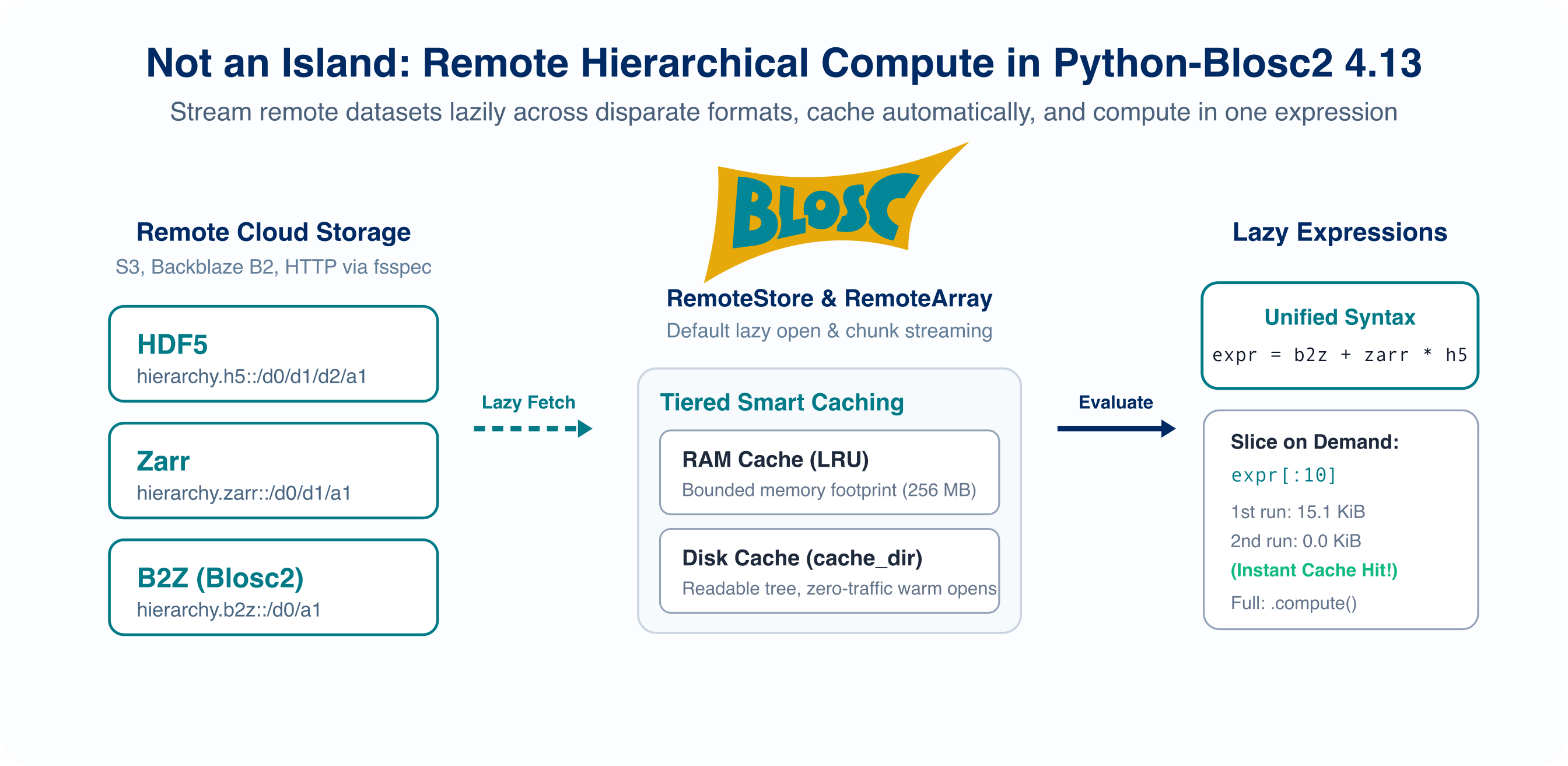
import blosc2

base = "https://s3.us-west-001.backblazeb2.com/blosc2/hierarchy"

with (
    blosc2.open(f"{base}.h5::/d0/d1/d2/a1", lazy=True, cache_dir="remote-cache") as h5,
    blosc2.open(f"{base}.zarr::/d0/d1/a1", lazy=True, cache_dir="remote-cache") as zarr,
    blosc2.open(f"{base}.b2z::/d0/a1", lazy=True, cache_dir="remote-cache") as b2z,
):
    expr = b2z + zarr * h5
    print(expr[:10])  # fetches only the chunks needed for the first 10 values
    result = expr.compute()  # materializes the full result as an NDArray
The three leaves above have shape (10000,), so they can be combined directly. Keep HDF5 opens before Zarr opens when using several remote formats in one process.
Choosing between fsspec and Caterva2
When opening an individual dataset with lazy=True, both fsspec URLs and Caterva2 URLPaths return a RemoteArray, providing an identical user interface for slicing, caching, and introspection.
For multi-dataset containers (B2Z, Zarr, and HDF5), a RemoteStore is returned instead, providing container-level discovery and shared caching across fsspec protocols.
What differs between the transports is the types of remote objects each can open:
Remote object |
fsspec URL / RemoteStore |
Caterva2 |
|---|---|---|
Standalone contiguous |
Yes ( |
Yes |
NDArray leaf inside |
Yes ( |
Yes |
CTable inside |
Yes ( |
No |
Zarr v2/v3 array |
Yes ( |
No |
HDF5 dataset |
Yes ( |
Yes |
Lazy or computed array |
No |
Yes |
fsspec supplies byte ranges. Python-Blosc2 parses the remote frame to discover its geometry and chunk offsets, making this route direct and efficient for standalone arrays.
Caterva2 understands dataset paths, array metadata, and slicing. It can therefore expose array-like data that is not stored as a standalone Blosc2 frame, as well as apply authentication or server-side computation. Use Caterva2’s navigation API to find a leaf in a remote hierarchy, then open that leaf with a
URLPath.
lazy=True changes when data is fetched; it does not expand the underlying storage formats supported by either route.
Tip
Browse remote hierarchies: To explore groups, inspect attributes, or preview arrays in remote .b2z, .zarr, or .h5 containers interactively in the terminal without downloading the complete container, use b2view (e.g. b2view s3://bucket/hierarchy.b2z). To navigate containers programmatically in Python, use RemoteStore.
Explore remote hierarchies with RemoteStore
RemoteStore discovery and navigation now live in Working with Remote Data. This heading remains as a pointer for existing links.
Access HTTP/HTTPS, S3, and cloud storage
Shared fsspec, cloud authentication, and concurrency guidance is in Working with Remote Data. Array-specific supported formats remain in Choose a remote route.
Cache policies and memory management
The MEMORY, DISK, and NONE policies are described in Working with Remote Data. Array reads, prefetching, and materialization below all use that shared policy.
Only what a slice touches
Blosc2 arrays are compressed in chunks, which are divided into smaller blocks. For a small slice, fetching only its blocks can avoid transferring most of a large chunk.
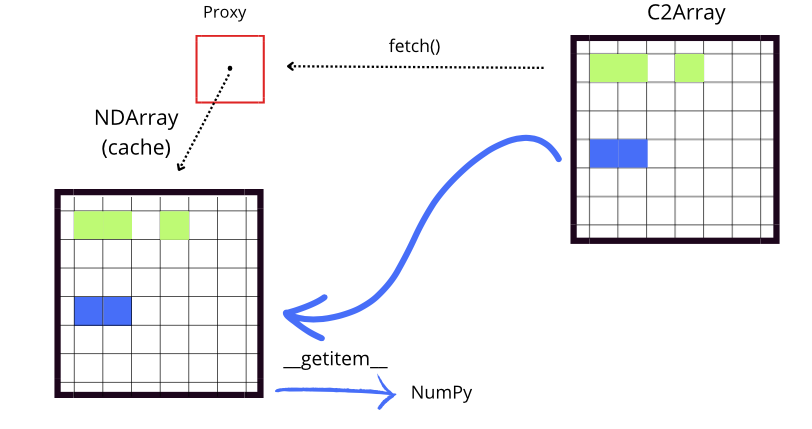
Purple regions are cached; red regions are still remote, and they do not use local storage.
The grid is schematic: where byte ranges are available, the fetched regions can be blocks within a chunk.
fetch() warms the cache and returns the remote array, whereas indexing returns the requested values.
The remote array chooses blocks or whole chunks automatically.
It fetches a whole chunk when most of its blocks are needed or when the source cannot expose block ranges, as with computed Caterva2 datasets.
Independent reads overlap, with up to eight concurrent requests by default; use max_concurrency=1 when concurrency does not help.
Stepped slices also use the block grid.
For example, a[::5] can reduce transfers along an axis whose blocks do not already span that axis.
Explicit cache pre-fetching
You can warm the cache proactively using fetch() or afetch():
# Synchronously pre-fetch a region into the cache:
a.fetch(slice(0, 10_000))

# Or asynchronously in an async event loop:
await a.afetch(slice(10_000, 20_000))
Both methods return a.
Prefetched data may be evicted to satisfy the cache limit; later indexing fetches it again as needed.
Use a.materialize(item) for an independent, complete NDArray.
Its output and temporary buffer are outside the cache limit.
[!NOTE]
fetch()andafetch()require a writable cache. On an immutable cache snapshot (such as an archive opened withmutable=False), pre-fetching raises an error.
a.cache exposes the underlying cache for inspection.
It may contain missing or evicted chunks and must not be treated as a complete array or mutated by callers.
Operations on a single handle are serialized through fetching, result assembly, eviction, and export. Async methods run synchronous operations in a worker thread; cancelling the await does not stop an already running fetch. Separate handles or processes sharing a disk carrier require external locking.
Measure network traffic
Shared traffic accounting and examples are in Working with Remote Data.
Persist and reopen remote references
Persist a remote array reference (.b2nd)
Use RemoteArray directly when a .b2nd file should carry a portable remote descriptor and, optionally, its own bounded persistent cache:
remote = blosc2.RemoteArray(
    "s3://bucket/big.b2nd",
    cache_policy=blosc2.CachePolicy.NONE,
)
remote.save("big-reference.b2nd")

# Or create a named cache carrier explicitly:
remote = blosc2.open(
    "s3://bucket/big.b2nd",
    lazy=True,
    cache_path="big-cache.b2nd",
    mode="a",
)
remote[:100]
The saved object contains source and geometry metadata but no credentials.
A .b2nd carrier is a local cache/reference file for a remote array, not a second copy of the remote dataset itself: it stores the source locator plus any warm compressed chunks that have already been fetched. This is why a file such as big-cache.b2nd can be reopened later and continue serving cached reads without re-fetching the remote source. To create a visible file with a predictable name, set cache_path="big-cache.b2nd" when opening the remote array or call save("big-cache.b2nd") on the live handle.
With CachePolicy.NONE, repeated reads contact the source and do not mutate the carrier.
With CachePolicy.DISK, the carrier file itself is the cache and retains compressed chunks up to its payload limit.
DISK and MEMORY arrays preserve valid warm chunks by default.
Pass include_cache=False to export a cold copy without mutating the warm carrier.
Store and table .b2z references, cache mutability, and the distinction between
save() and materialize() are documented in Working with Remote Data.
Retrieve scattered points
A remote array maps coordinate arrays and boolean masks to the blocks that contain their selected points:
a[rows, :100]
a[mask]
For Caterva2, a bare C2Array can be substantially more efficient for one-off point queries: it sends coordinates to the server, which evaluates the selection and returns only the selected values.
Prefer direct C2Array indexing for sparse, one-off point retrieval; prefer a RemoteArray when reuse through a local cache matters.
Remote tables
Remote CTable access, filtering, buffering, saving, and materialization now live in Working with Remote Tables. This heading remains as a pointer for existing links.
Handle source changes
Local and remote caches assume the source is immutable by default. After replacing data at the same path or URL, close other cache handles and refresh:
array.refresh()for a standaloneRemoteArrayreplaces its metadata and cached chunks, even if its shape changed.table.refresh()for a standaloneRemoteCTablealso rebuilds its indexes.store.refresh()for aRemoteStorerebuilds the hierarchy. Retrieve child arrays and tables again afterward; they cannot refresh themselves.
Shared sparse RemoteArray caches cannot be refreshed directly; use a new URL
or cache directory. See Working with Remote Data and Working with Remote Tables for store
and table details.
For a replaceable .b2nd or Caterva2 source, assume_immutable=False checks
its identity before each read and invalidates stale chunks automatically.
Other source formats require explicit refresh when data changes at the same
location.
A direct Proxy cache reports a source mismatch in append mode:
p = blosc2.Proxy(source, urlpath="cache.b2nd", mode="a")
# ValueError if cache.b2nd belongs to different remote bytes
Use mode="w" to start that cache again. If a source cannot provide an
identity, compatibility is checked only from shape, dtype, chunks, and blocks.
Fill a Caterva2 array concurrently
Several writers can fill one Caterva2 array when each chunk is written at most once. First create and upload an uninitialized array with its final geometry:
import blosc2
import numpy as np

blosc2.uninit(
    (1_000_000,),
    dtype=np.float64,
    chunks=(100_000,),
    blocks=(10_000,),
    urlpath="run.b2nd",
)
cat2-client upload run.b2nd @personal/run.b2nd
Each writer compresses and posts the chunks it owns:
import math

a = blosc2.C2Array("@personal/run.b2nd", urlbase="https://cat2.cloud/demo")
chunk = blosc2.compress2(
    data,
    typesize=a.dtype.itemsize,
    blocksize=math.prod(a.blocks) * a.dtype.itemsize,
)

try:
    a.update_chunk(nchunk, chunk)
except blosc2.ChunkAlreadyWritten:
    pass  # another writer completed this slot
The server serializes updates, and C2Array.written_chunks() reports progress from the array’s index:
written = a.written_chunks()
for nchunk in np.flatnonzero(~written):
    ...  # chunks still missing after a restart
Use your own transport
Subclass ByteRangeNDSource when the frame lives behind a transport that fsspec cannot use:
import boto3
import blosc2


class S3Source(blosc2.ByteRangeNDSource):
    def __init__(self, bucket, key):
        self.s3 = boto3.client("s3")
        self.bucket, self.key = bucket, key
        self.stamp = self.s3.head_object(Bucket=bucket, Key=key)["ETag"]
        super().__init__(f"s3://{bucket}/{key}")

    def read_range(self, offset, size):
        response = self.s3.get_object(
            Bucket=self.bucket,
            Key=self.key,
            Range=f"bytes={offset}-{offset + size - 1}",
        )
        data = response["Body"].read()
        self.traffic.charge(len(data))
        return data


a = blosc2.Proxy(S3Source("bucket", "big.b2nd"), urlpath="cache.b2nd", mode="a")
Initialize the transport before super().__init__(), because the base constructor immediately reads the frame header.
Make read_range() thread-safe, set stamp so persistent caches can detect changes, and charge the bytes read so traffic measurements remain accurate.
For ordinary remote access, use blosc2.open("https://...", lazy=True) or blosc2.open("s3://bucket/big.b2nd", lazy=True); the custom class only illustrates the transport contract.
See also
Tutorial 6 — a step-by-step introduction with output.
examples/remote/s3-access.py— remote access across Blosc2 (.b2nd, .b2z), Zarr, and HDF5 with timing and network traffic metering.examples/remote/store-browse.py— inspecting hierarchies, leaf previews, and shared caching across leaves.examples/remote/lazy-expr.py— evaluating a lazy expression over remote B2Z, Zarr, and HDF5 arrays.examples/remote/c2array-get-slice.py— opening and reading remote Caterva2 arrays via URLPath.examples/remote/c2array-traffic.py— block, chunk, and cached transfer sizes against Caterva2.examples/remote/c2array_expr.py— lazy expression evaluation on remote Caterva2 arrays.examples/remote/concurrent-fsspec.py— concurrent chunk fetching (max_concurrency) on high-latency stores.examples/remote/fsspec-cat2-access.py— one dataset and cache through fsspec and Caterva2.examples/remote/proxy-carray.py— creating a persistent local disk proxy of a remote Caterva2 array.examples/remote/rw-fsspec.py— fsspec reading and writing examples.b2view — interactive terminal browser for local and remote containers.
Working with Remote Data — shared remote caching, traffic, references, and hierarchy navigation.
Working with Remote Tables — remote CTable access.
RemoteArray, C2Array, B2ZNDSource, ZarrNDSource, HDF5NDSource, FsspecNDSource, ByteRangeNDSource, and Proxy — API reference pages.